Review Triage
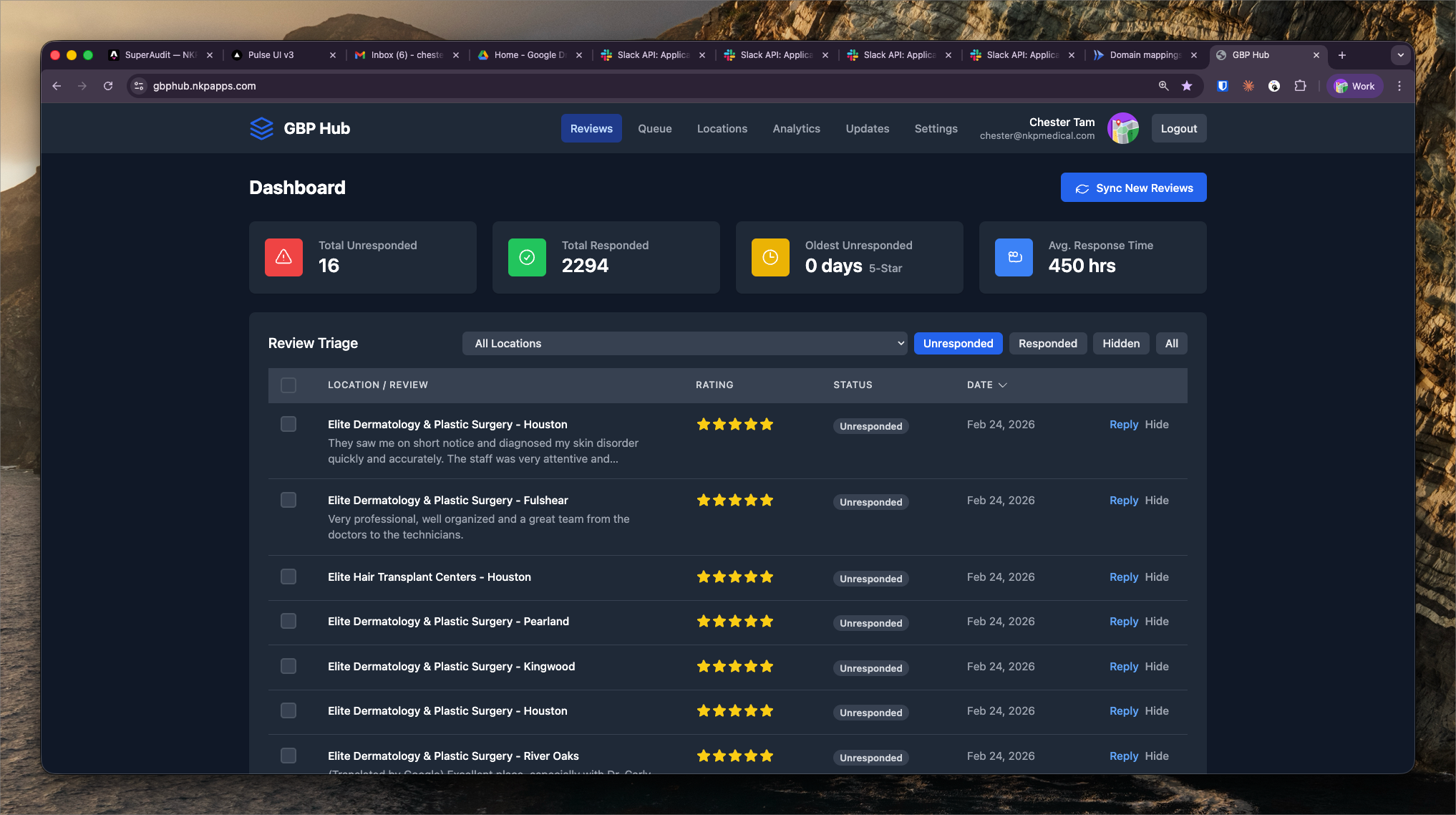
2,294 total reviews across all NKP client locations — surfaces unresponded reviews by rating, location, and recency for fast triage.
What It Shows
Review Triage is the primary working view in GBP Hub for account managers. It surfaces all Google reviews across NKP client locations that haven't yet received a response, sorted by priority.
Current snapshot:
- 2,294 total reviews across all monitored locations
- Filter by rating (1–5 stars), location, date range, and response status
- Sorted by recency and rating to surface urgent 1-star reviews first
Why Review Response Matters
Google's algorithm factors review response rate and response time into local pack rankings. Unanswered negative reviews also damage conversion rates — prospective patients often read the most recent reviews before calling.
The standard NKP target is to respond to all new reviews within 48 hours. The triage view makes this achievable at scale across hundreds of locations by surfacing only unresponded reviews.
Triage Workflow
- Filter to "Unresponded" status
- Sort by rating ascending (1-star first)
- Review the generated response from Auto-Respond (see that capability)
- Approve or edit the response
- Mark as responded — response is posted via the GBP API
Each review row shows the reviewer's name, star rating, review text, location name, and date. Clicking a review expands to show the full text and the Auto-Respond draft.